
Understanding User Permissions
Many issues are caused by missing permissions or licenses.
“I can’t see forms / case tabs / immigration features”
This usually means the user does not have the Immigration Library assigned.
Important clarification:
- Core subscription ≠ Immigration Library
- The Immigration Library is an add-on.
Pricing (for reference):
- $25/user/month (monthly)
- $20/user/month (yearly)
Only admins can assign libraries.

How admins manage subscriptions and libraries
- Click your name in the top-right corner.
- Open the Administrator Panel.
- Go to the Subscriptions tab.
You’ll see three main sections:
- Subscription – manage Core and add-on libraries
- Payment – manage billing and payment methods
- Users – invite users and assign access
To give a user access:
- They must have Core.
- Any library (Immigration, etc.) must be added separately.
- Libraries can only be assigned if they’ve been purchased.
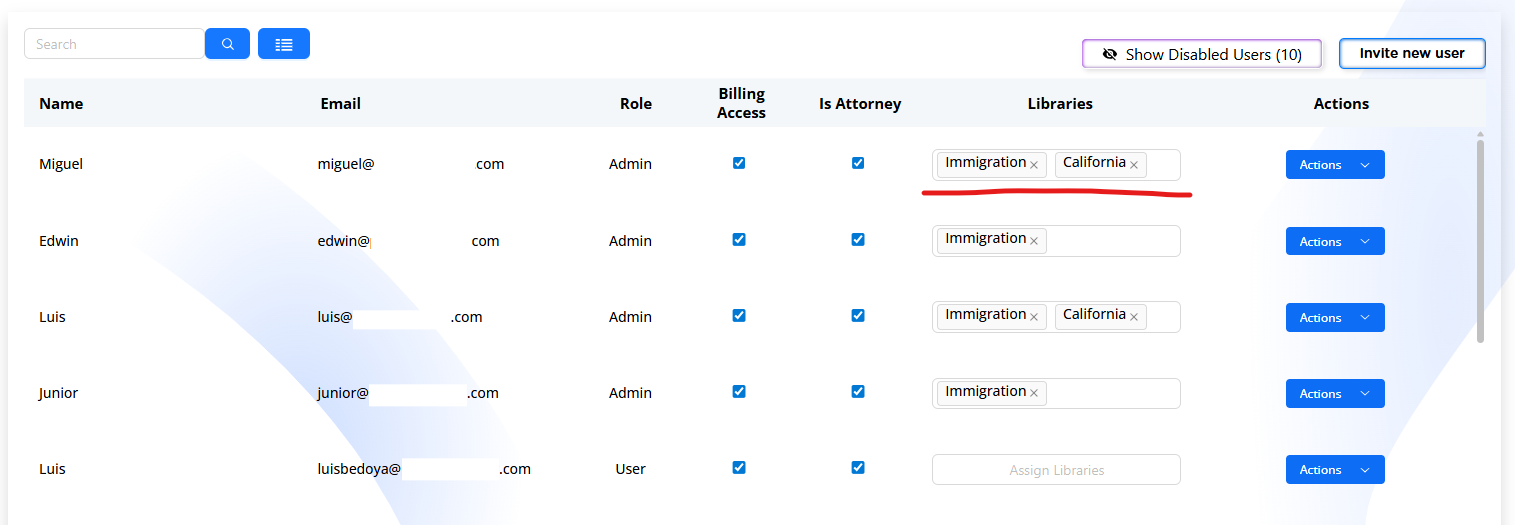
Managing users and permissions
From Administrator Panel → Subscriptions → Users:
Admins can:
- invite new users
- assign or remove libraries
- set roles (Admin, Attorney, Paralegal)
- grant or remove billing access
- mark a user as attorney or non-attorney
- edit user profile details
- disable users to free licenses
If a user “can’t do something,” check:
- their role
- assigned libraries
- billing permissions
NOTE: Always make sure to view if there are any libraries pending to assign to users after they have been invited, and they have logged in / activated their account. If no libraries are assigned to the new user, then they will be unable to access forms or create cases.