
Chrome Extension
The Prima.Law Chrome Extension is the essential bridge connecting your legal database with official government portals such as USCIS, CEAC, EOIR, and CBP. This tool eliminates manual data entry, reduces human error, and significantly accelerates your filing workflow.
1. How to Install the Extension
You can set up the extension using either of these two quick methods:
Option 1: Using the Support Link
- Access the Link: Click the direct download link provided in our support article.
- Add to Chrome: On the Chrome Web Store page, click the blue “Add to Chrome” button.
- Confirm: Click “Add Extension” in the pop-up window to finish.
Option 2: Using Google Search
- Search: Go to Google and type:
Prima.Law Chrome Extension. - Select: Click on the first official result from the Chrome Web Store.
- Install: Follow the same "Add to Chrome" steps mentioned above.
Pro Tip: Once installed, click the puzzle piece icon in your browser and click the pin icon next to Prima.Law to keep the extension visible at all times.
2. Core Features: What can you automate?
Once the extension is active (indicated by the blue toggle in chrome://extensions/), you can perform the following tasks directly from your contacts' profiles:
Automated Form Filling (Autofill)
- CEAC Forms (DS-160 & DS-260): Use the “Send to Extension” function within Prima.Law to automatically transfer contact data into consular forms (The button shows per form, in the forms list).
- USCIS E-filing: Seamlessly fill approximately 18 different forms available for online filing on the USCIS portal.
Government Data Synchronization
- Travel History (CBP): Access the I-94 website to automatically pull a contact’s travel history and I-94 records into their profile.
- Immigration Court (EOIR): Import case information from the EOIR A# lookup website directly into the contact’s profile.
- USCIS Receipt Tracking: Update and monitor status information for I-797 forms and other receipt notices in real-time.
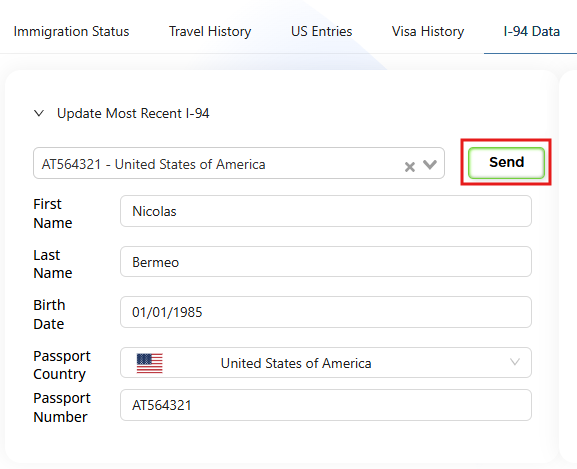
I‑94 Data Importing via the Prima.Law Chrome Extension
The I‑94 “Send” button inside the Contact Page allows users to automatically import court‑related information into Prima.Law. This functionality is powered entirely by the Prima.Law Chrome Extension, which enables your browser to read and transfer structured data from supported court portals.
How the Import Works
- Court Portal Detection — When you navigate to a supported court website, the extension identifies the relevant I‑94 data fields.
- Data Extraction — The extension securely reads the publicly available case information displayed on the page.
- One‑Click Transfer — Clicking the Send button in the I‑94 tab triggers the extension to package the extracted data and send it directly into Prima.Law.
- Automatic Logging — The imported information is added to the appropriate contact or case record, reducing manual entry and ensuring consistency.
3. Requirements for Proper Functioning
To ensure the extension communicates correctly with the government portals:
- Active Session: You must have your Prima.Law account open in a browser tab.
- Toggle ON: Ensure the extension is enabled (the switch should be blue) in your Chrome Extension settings.