
Agency & Workspace Settings
(Admin users only). This article covers the essential workspace setup steps for firm owners and administrators.
Agency & Workspace Settings
(Admin users only)
This article covers the essential workspace setup steps for firm owners and administrators.
Accessing workspace settings
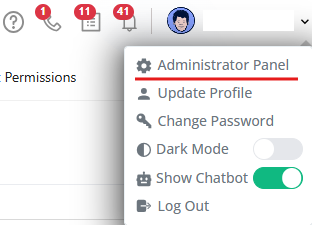
- Click your name in the upper-right corner.
- Select Administrator Panel.
- From here, you can manage your firm’s core configuration.
Firm info
- Review and update your firm’s name, address, and contact details.
- This information is used across documents, forms, and client communications.
Client Portal
- Configure basic client portal settings, including:
- Firm branding (logo, name)
- Client-facing details
- These settings control how clients experience your portal.
What’s not covered here
This guide focuses only on initial setup. Billing, integrations, advanced permissions, are covered in their own dedicated sections.