Using Important Notices
What Is an Important Notice?
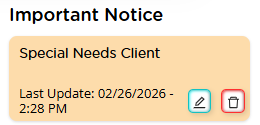
An Important Notice is a persistent note attached to a contact. Once created, it becomes visible across:
- The contact page
- Every case associated with that contact
This means the notice follows the contact throughout the system, ensuring consistent visibility no matter which case is being accessed.
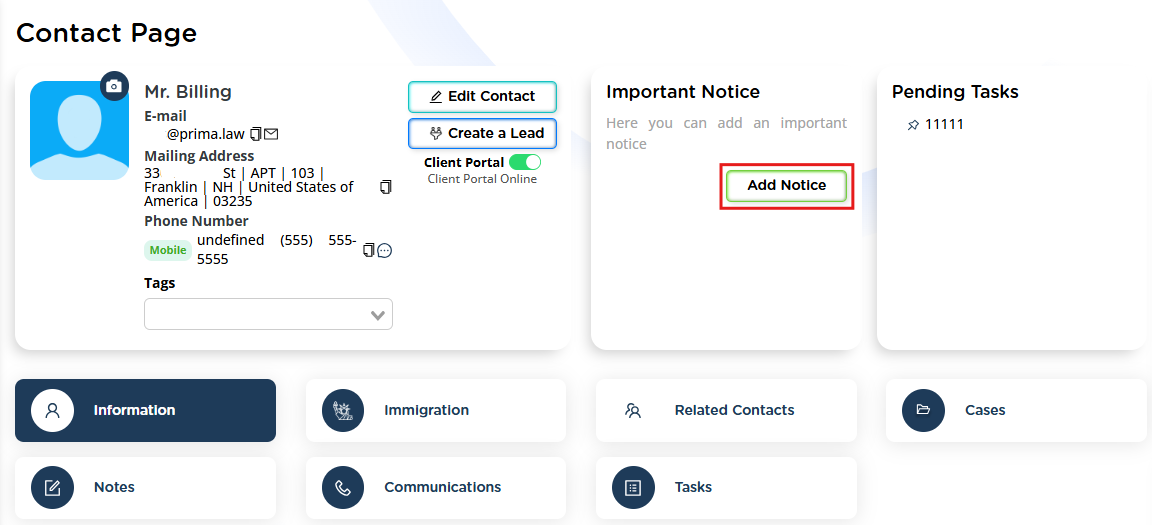
The Important Notice appears at the top area of both the Contact page and the Case page, next to the General Information section.
How to Add an Important Notice
- Go to the Contact page or any associated Case page.
- Locate the Important Notice section at the top.
- Click Add Notice.
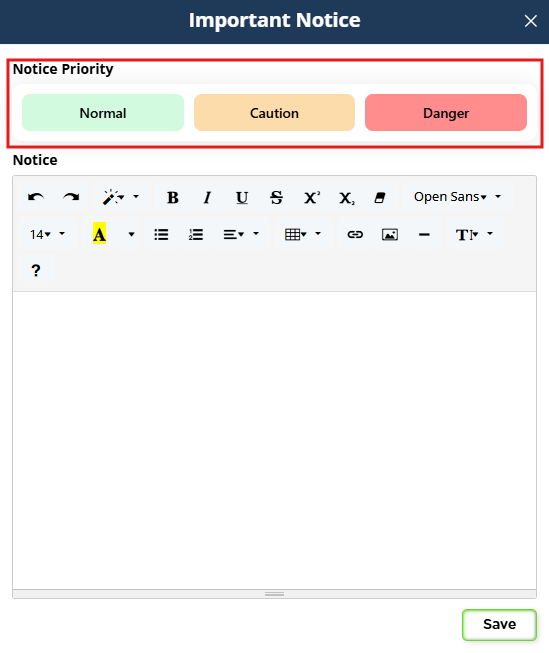
- Select the appropriate importance level.
- Enter your message and save.
Importance Levels
When creating a notice, you can choose between three levels:
- Normal (Green) – General important information
- Caution (Yellow) – Situations that require attention
- Danger (Red) – Critical issues or urgent matters
These color levels provide flexibility and help visually communicate the urgency or seriousness of the notice.
When Should You Use an Important Notice?
Important Notices are especially useful when:
- There are special instructions related to the client
- A client has specific behavioral or communication considerations
- There are compliance concerns
- Case strategy or internal directions have changed
- There is sensitive or urgent information everyone must be aware of
Since the notice is visible to all team members in the firm, it improves internal communication and prevents misunderstandings.
Important Limitations to Keep in Mind
- Only one Important Notice per contact can exist at a time.
- You cannot create multiple separate notices.
- If you need to include multiple points, you must combine them into a single notice (you may separate or itemize information within that single notice).
Because the notice is persistent and shared across all cases, it will always be the same message wherever the contact appears.
Why This Feature Matters
The Important Notice feature improves visibility, consistency, and collaboration within your firm. It ensures that critical information about a client is never missed, regardless of who is working on the file or which case is open.
Make use of this feature whenever there is information that should remain front and center for everyone involved.