
Adding Users & Managing Permissions
(Admin users only). Admins can invite team members and control what each user can access.
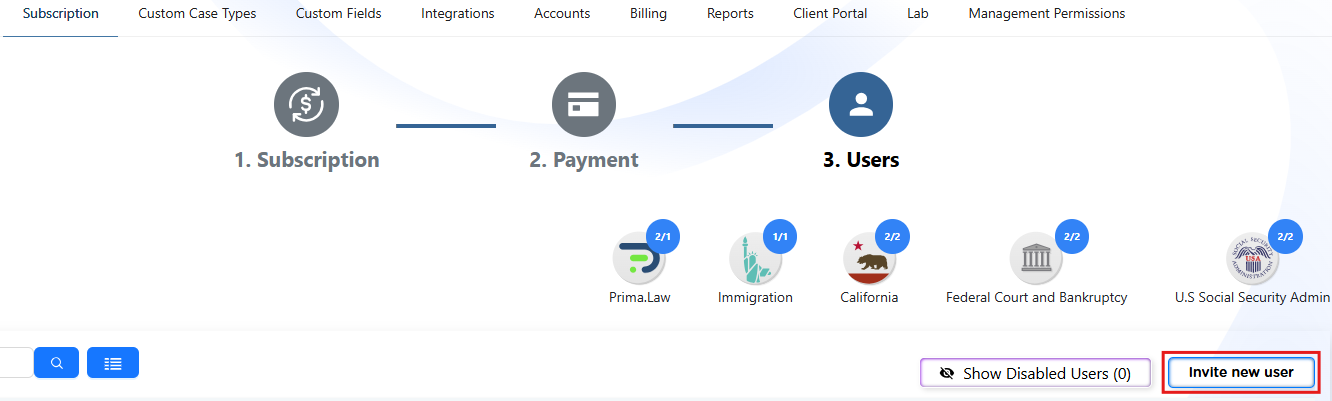
Inviting users
- Go to the Administrator Panel.
- Go to the Subscriptions tab.
- Select Users.
- Click Add User and enter the user’s email address and full name.
- Send the invite.
Activating users
- Once invited, users must accept their email invitation.
- After acceptance, the account becomes active.
- Alternatively, Admins can choose to manually activate a user in case they want to assign a library from the get-go.

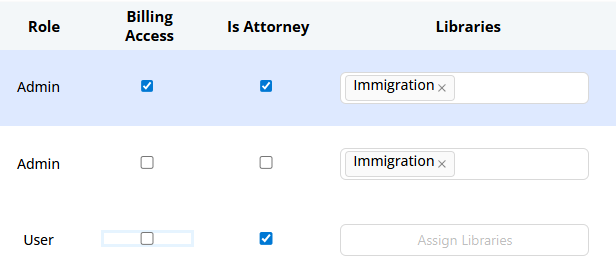
Assigning access and libraries
- Assign the appropriate role or permissions to each user.
- Enable access to the libraries or features your firm has purchased.
Managing existing users
- Update permissions as roles change.
- Deactivate users who no longer need access.
Good permission management helps keep your workspace secure and organized.